


Credit Sesame: Grow your score
4.732.07K Reviews
App Specs
- Version
- 7.30.1
- Updated On
- License
- Free
- Downloads
- 5,000,000+
- Developer
- Credit Sesame, Inc.
- Categories
- Finance
- Platform
- Android, iOS
Screenshots

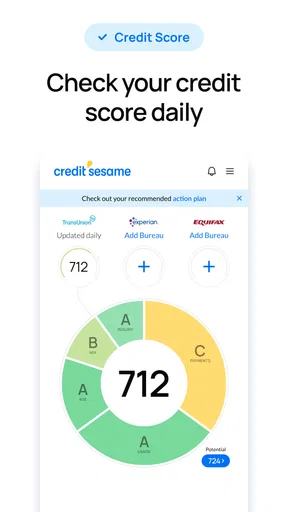
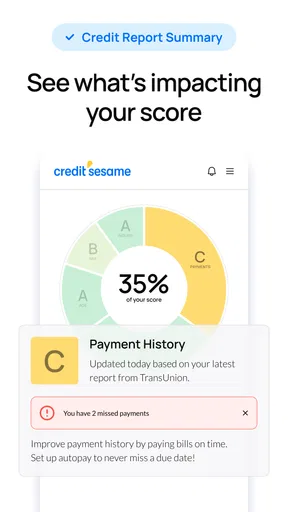


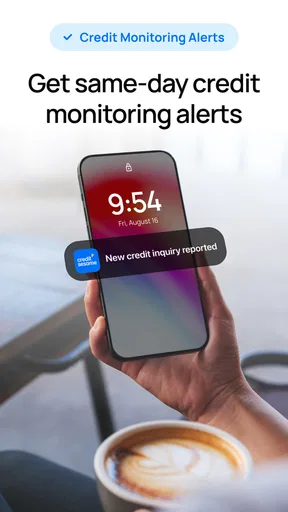


 Analysis by AppCompare
When I’m trying to make sense of my credit, I want a quick overview without having to piece together several separate tools. Credit Sesame is built for that kind of check-in: it puts credit information, monitoring and guidance in one finance app. I see its main value less as a shortcut to a better score and more as a way to keep credit on my radar, notice changes and decide what to look into next.
Who benefits from having a credit overview close at hand
I’d recommend trying it if you’re new to credit, preparing to apply for a financial product, or simply want a regular reminder to review your credit picture. A single dashboard can make it easier to connect a score change with the broader report and debt information shown in the app. That context is more useful than checking a number in isolation, especially when you’re still learning which parts of your credit profile deserve attention.
It can also suit someone who already checks credit elsewhere but wants another place to keep an eye out for changes. The trade-off is that adding another financial app creates another dashboard to interpret and another source of notifications to manage. If you already have a trusted service that gives you the detail and alerts you need, this may feel more like a convenient extra than an essential replacement.
Making a routine check more useful
A practical approach is to set a regular time to open the app rather than reacting to every notification. For example, after paying bills on a weekend, I’d review the displayed score and report snapshot, then look at any change alert and check whether it calls for a closer look. If something appears unfamiliar, I’d treat the alert as a prompt to investigate, not as proof that fraud has occurred. That small distinction helps keep monitoring useful without letting every change become a cause for alarm.
Before a major application, I’d use the app as an early review, not as a promise about the outcome. A credit score is one part of a lender’s decision, and a number viewed in one app cannot guarantee approval or tell you exactly what terms you’ll receive. If a report detail looks wrong, take time to check the underlying information and follow the appropriate correction process rather than assuming a general tip will fix it.
Choosing between an app, a bank tool and a credit report
Compared with a bank’s built-in credit view, a dedicated service such as this can make monitoring and credit-focused guidance feel more central. A bank tool may be more convenient if you already manage your accounts there, while a dedicated credit app can be appealing if you want credit information separated from everyday spending. Neither approach is automatically better: I’d choose based on which view is clearer and which one I’m more likely to check consistently.
It also isn’t a substitute for examining a full credit report when you need to verify details. A compact score display is useful for a quick read, but a report is the better place to investigate an unfamiliar account or an error. I’d use Credit Sesame for awareness and routine follow-up, then turn to the relevant report or organization when the issue needs a more formal response.
Worth Reading Before You Choose

EA SPORTS FC Mobile 26 Is a Bigger Football Game, but It Takes Time

Flipboard Shows What News Apps Must Do Beyond the Feed

Switching to Android Auto Means Rethinking Your Driving Routine

Google Calendar Makes a Crowded Week Easier to Manage

Ludo King Makes the Most of the Minutes Between Plans

Baby Panda World Brings Quick Play to Modern Phones, but Its Game Library Feels Busy
Questions to consider before relying on alerts
Will it tell me exactly what caused a score change? The app offers monitoring and personalized guidance, but I would still look at the report context before deciding what a change means. Should I expect instant updates? I’d treat alerts as useful notices rather than a guarantee that every credit event will appear immediately. That is a sensible way to use any monitoring service: let it draw attention to something, then verify the details.
Is it useful if I’m not applying for credit soon? It can be, if you want a steady habit of checking your credit health, but it may be unnecessary if you rarely need that view and already have a service you trust. Can it replace professional help for a complicated credit problem? I wouldn’t rely on an app alone for a dispute or a difficult financial decision. Its guidance can help you identify what to examine, while complex cases may call for direct support from the relevant organization or a qualified adviser.
Getting Started with Credit Sesame
First things first, downloading Credit Sesame is a breeze. Available on both Android and iOS, it’s just a matter of a few taps, and voila, you’re in. Once installed, setting it up is pretty much like clockwork. You’ll be asked to enter some basic information, and before you know it, you’ve got your credit score right there in your pocket. It’s like having a financial advisor on speed dial but way cooler.
The Dashboard Experience
Upon opening the app, you’re greeted with a dashboard that’s as neat as a pin. It’s all laid out in a way that even your grandma could navigate with ease. Your credit score is front and center, which is super convenient. They use a color-coded system, so you instantly know where you stand—green for good, red for not so much. It’s like having a traffic light for your finances!
But it doesn’t stop there. The dashboard gives you a snapshot of your credit report, debt analysis, and even personalized tips on how to improve your score. It’s like having a personal trainer but for your finances.
Features Worth Talking About
What really sets Credit Sesame apart is its array of features. Let’s break it down:
- Free Credit Monitoring: Who doesn’t love free stuff? This feature keeps tabs on your credit score and notifies you of any changes. It’s like having a watchdog for your credit health.
- Identity Theft Protection: This one’s a biggie. In today’s world, you can never be too safe. The app offers up to $50,000 in insurance for identity protection. Talk about peace of mind!
- Financial Advice: Tailored advice based on your credit profile is just a tap away. It’s like having a financial guru in your pocket, whispering tips and tricks to help you out.
Ease of Use
Now, let’s talk about usability. The app is so intuitive that even if you’re tech-challenged, you’ll find it a walk in the park. The navigation is smooth, and everything is logically placed, making it easy to access all the features without breaking a sweat.
One thing I really appreciate is how they’ve designed it to be user-friendly without dumbing down the content. It’s informative yet digestible, which is a balance many apps struggle to achieve.
Room for Improvement
While Credit Sesame is a fantastic tool, there’s always room for improvement. Occasionally, the ads can be a bit much. They’re not overwhelming, but if you’re someone who gets annoyed easily, it might be a slight hiccup.
Another thing to note is the premium features. While the free version is robust, the premium options offer more in-depth insights. If you’re serious about taking your credit score to the next level, you might want to consider upgrading.
Final Thoughts
All in all, Credit Sesame is a solid app that does what it says on the tin. It’s a reliable companion on your journey to financial health. Whether you’re a newbie trying to make sense of credit scores or a seasoned pro looking to keep tabs on changes, this app has got you covered.
So, if boosting your credit score is on your to-do list, give Credit Sesame a whirl. It’s like having a mini financial advisor in your pocket, ready to help you grow that score and reach your financial goals. Happy scoring!
How it fits into a broader credit routine
I’d use the app as one layer in a simple routine, not as the only place I ever look. Its score, report snapshot and debt analysis can help me decide what deserves a closer look; a full report remains the better reference when I need to check specific entries. This distinction matters because an easy-to-read overview is designed to make patterns visible, not to replace careful verification when something seems off.
One useful habit is to separate actions from observations. A notification is an observation: it tells me that something changed. Paying a bill on time, reviewing a balance or checking a report entry is an action I can take for a reason. I wouldn’t make a financial move just to chase a number in the app. I’d first understand what the suggested step is meant to address and whether it fits my own situation.
Small habits that make the advice easier to act on
Personalized suggestions are most helpful when I turn them into a short, realistic checklist. If the app points me toward an area of my credit profile, I’d note the specific question I need answered, then review the relevant account or report detail before changing anything. That keeps broad guidance from becoming a vague goal such as “improve my score” and helps me avoid acting on a tip without understanding its context.
I’d also avoid checking repeatedly throughout the day. Credit health is better treated as a gradual project than a live game with a score that needs constant attention. A planned review gives me a calmer way to spot changes, compare what I’m seeing over time and decide whether I need to follow up. For someone prone to worrying about financial numbers, limiting checks to a routine can make monitoring feel more manageable.
Speed, busy moments and reliability
For ordinary use, the appeal is that the main credit snapshot and related information sit together, so a quick check should feel more direct than moving between separate services. I wouldn’t expect any credit app to make the underlying financial process faster: the value here is in presenting information and drawing attention to changes, not in controlling when outside records update. If a screen or alert doesn’t immediately answer a question, looking at the report context is more useful than repeatedly refreshing.
The busiest moment is likely to be when a score alert arrives just as I’m dealing with a bill, application or unfamiliar account. I’d resist making a rushed decision from the notification alone. Open the app when there’s time to review the surrounding information, note what changed, and verify anything consequential through the appropriate source. That workflow is less dramatic than treating every alert as urgent, but it is a better fit for a monitoring tool.
As a finance app, it is also worth considering the practical demands of installing and maintaining it. Credit Sesame is free, rated for Everyone, and developed by Credit Sesame, Inc. Its listing shows an average rating of 4.7 from around 196 thousand ratings, with more than 5 million installs. Those figures suggest it is familiar to many users, though popularity alone cannot tell me how it will behave on a particular phone or resolve an account-specific issue.
Device fit, privacy-minded choices and alternatives
The app’s current version is 7.24.1, and the minimum operating-system requirement is 10. Before installing, I’d check that my device meets that requirement and has enough room for another app; if it doesn’t, a browser-based or bank-provided credit view may be the more practical choice. I’d also keep the app updated through the normal store process, especially for a service I use to review financial information. I can’t infer battery use or speed on every device from the app’s general description, so I’d judge those in ordinary use rather than assume the same experience for everyone.
Because the setup involves personal information, I’d pause to read each prompt and understand what I’m choosing to share before proceeding. That’s a sensible step for any credit-monitoring service, particularly if I’m installing it on a shared device. If I don’t want a dedicated app, I can use the credit tools available through a financial institution or consult a full report directly. Those alternatives may suit people who prefer fewer apps or need a more formal, detailed review rather than ongoing dashboard access.
What the free option does—and where to be cautious
The app is free to download, but the original review also notes premium options and advertising. I’d start with the free experience and see whether its monitoring and guidance answer my actual questions before considering anything beyond it. Ads can interrupt the feeling of a clean finance dashboard, and a premium tier is not automatically worthwhile just because it offers more detail. I’d compare any paid choice with the specific information I need and avoid upgrading simply because I’m anxious about a score change.
The identity-protection coverage mentioned in the app’s feature description is another reason to read the terms carefully rather than treating a headline benefit as a complete solution. I’d want to understand what the protection covers and what steps are required before relying on it. More generally, no monitoring alert can prevent every problem or replace checking questionable activity promptly. The best use of a feature like this is as an extra layer of awareness, paired with careful follow-up when something does not look right.
My performance verdict
Credit Sesame makes the most sense for someone who wants a readable credit overview, alerts and tailored pointers in one place, and who is comfortable treating those pointers as a starting point. Its everyday strength is convenience: it can turn a vague intention to pay attention to credit into a repeatable check-in. It is less suitable for anyone expecting guaranteed score gains, instant explanations for every change, or a complete substitute for detailed reports and direct help with complicated problems.
Overall, I’d give it a try if regular credit awareness is useful to me and the minimum device requirement fits my phone. I’d keep my expectations grounded, verify important details and use the free features before deciding whether anything more is needed. With that approach, this finance app can be a handy part of a credit routine—without asking me to mistake a convenient dashboard for the whole picture.
Pros
- Easy-to-use interface for all users.
- Provides free credit score updates.
- Offers personalized credit tips.
- Includes identity theft protection.
- Accessible on both Android and iOS.
Cons
- Occasional app glitches reported.
- Limited features in free version.
- Ads can be intrusive at times.
- Some updates may lag slightly.
- Premium features are costly.
FAQs for Credit Sesame: Grow your score
What is Credit Sesame and how does it work?
Credit Sesame is a personal finance app designed to help you monitor and improve your credit score. It provides users with free access to their credit score, credit report card, and personalized financial tips. The app uses your financial data to offer insights and recommendations for improving your credit health.
Is Credit Sesame safe to use?
Yes, Credit Sesame is safe to use. The app employs robust security measures, including encryption and secure data storage, to protect your personal information. It is also a well-established service with positive reviews from users and experts, ensuring reliable and secure management of your financial data.
Does using Credit Sesame affect my credit score?
No, using Credit Sesame does not affect your credit score. The app performs a "soft inquiry" to access your credit information, which does not impact your score. This allows you to regularly check your credit status and receive personalized advice without any negative effects on your credit rating.
Is Credit Sesame free, or are there any hidden costs?
Credit Sesame offers a free version that includes basic features like credit score monitoring and financial tips. However, there are optional premium services available for a fee, such as identity theft protection and credit monitoring. These are clearly outlined in the app, allowing users to choose according to their needs.
Can I use Credit Sesame on multiple devices?
Yes, Credit Sesame can be used on multiple devices. It is available for both Android and iOS platforms, allowing you to access your account from smartphones and tablets. Simply log in with your credentials on any device, and your information will be synced and accessible wherever you need it.


